Do MSP leads go cold after someone fills out a form or signs up for your webinar?
If you think marketing ends when a lead opts in, you’re making the biggest mistake most MSPs make.
Here’s the truth:
A form fill or webinar registration doesn’t mean someone is ready to buy. Without a proper nurture plan, you’ll be invisible by the time they are ready.
In this post, I’ll explain:
- Why nurturing is essential for MSP leads
- How to build a simple automation that keeps you top-of-mind
- How to add low-cost retargeting ads for constant visibility
- The exact setup we use at IT Rockstars (you can replicate this in under 48 hours)
Why MSPs Need a Lead Nurture System
Question: Why is lead nurturing so important for MSPs?
Answer: Because only a small percentage of leads are ready to switch IT providers right now. Most are still researching, waiting for a contract to end, or comparing options.
If you don’t keep showing up after that first contact, they’ll forget you.
Nurturing achieves two things:
- Stays Top-of-Mind: You keep showing up in their inbox and social feeds until they’re ready.
- Shortens the Sales Cycle: By the time you speak, they already know you, trust you, and understand your services.
The Big Picture: How Our MSP Marketing Works
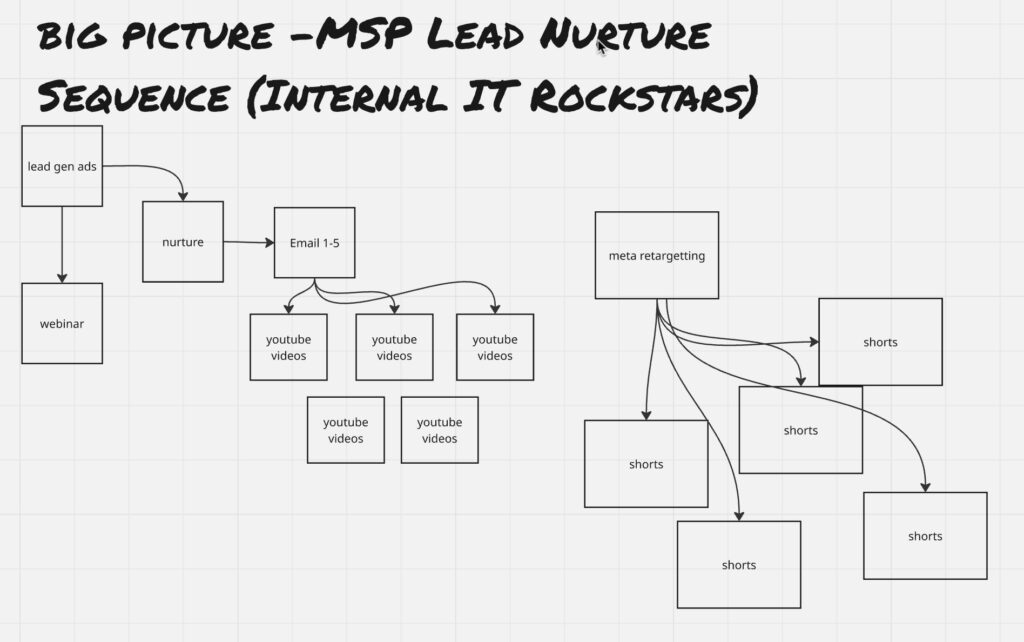
Here’s the map we use at IT Rockstars:
- Run Ads: Lead generation ads promote a webinar (or other lead magnet).
- Capture Leads: People register, but only ~25% attend the live event.
- Nurture: Everyone who registers enters a system that keeps them warm with emails and retargeting.
The goal isn’t just to get leads. The goal is to make your future sales calls frictionless.
Step 1: Build an Automated Email Sequence
What to do:
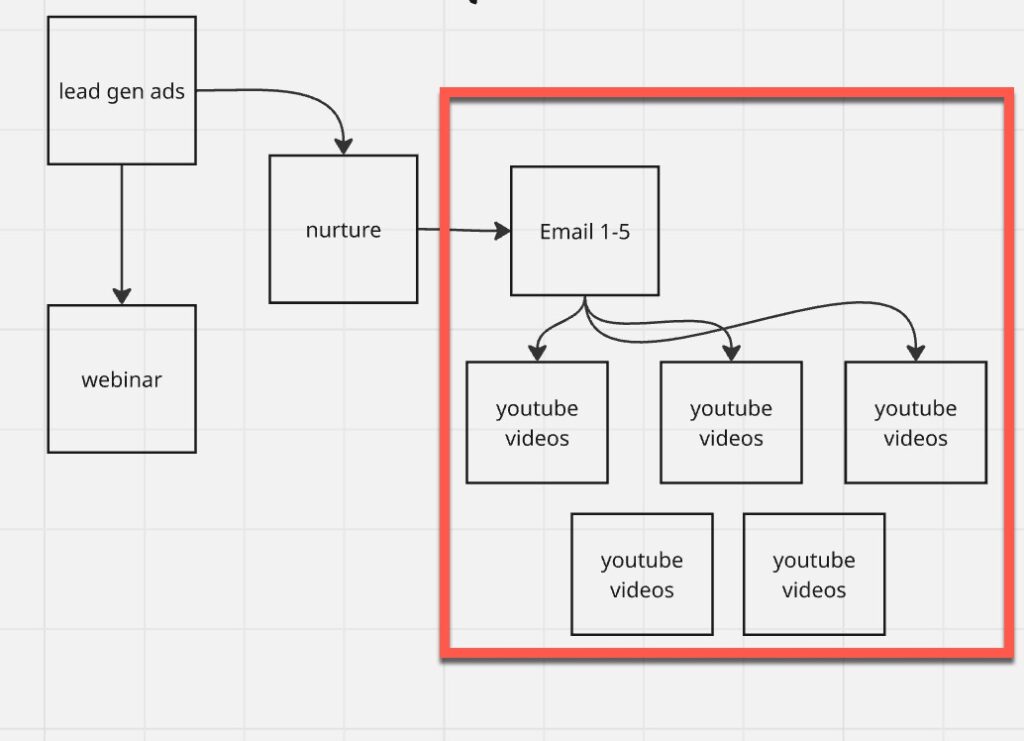
- As soon as someone registers or fills in a form, add them to a 5-day email sequence.
- Send one email per day, each linking to a short, valuable YouTube video.
- Keep the videos evergreen so they remain relevant over time.
Why it works:
- Educates prospects about your services before you ever speak to them.
- Boosts your YouTube channel since traffic from emails increases visibility.
Step 2: Add Retargeting Ads (Budget: $3–$5/Day)
Not everyone opens your emails. Retargeting ensures they keep seeing you elsewhere.
Here’s how:
- Create a custom audience in Meta Ads (Facebook + Instagram) of:
- People who visit your website
- People who interact with your ads
- People who view your social media content
- Run video view ads showing short clips (30–60 seconds) created from webinars or long-form videos.
Pro Tip:
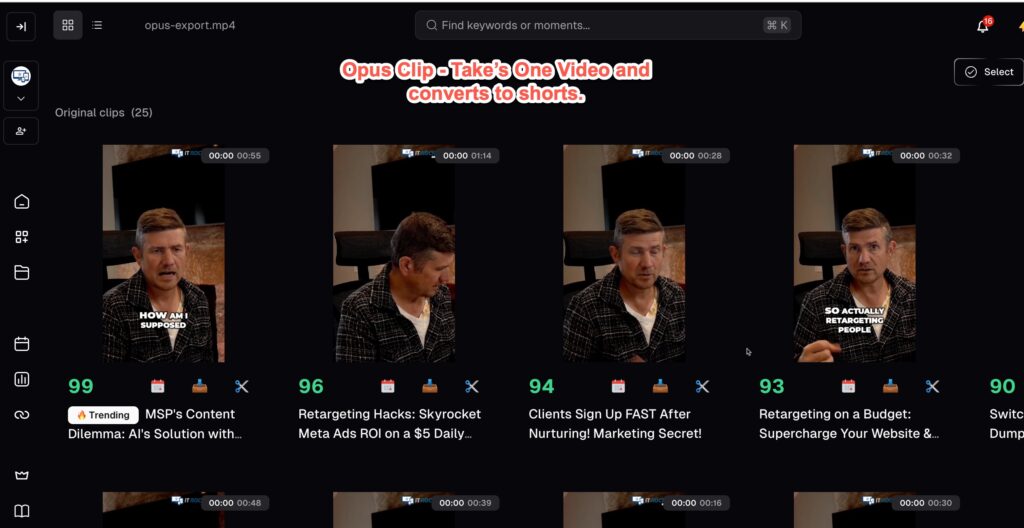
You can use AI tools like Opus Clip to automatically turn one long video into 10+ short clips.
How the Retargeting Campaign Works
- Keep your retargeting audience fresh (30 days is ideal).
- Show short videos that highlight tips, case studies, or quick wins.
- Frequency tip: Aim for 2–3 impressions per week per person. Too many, and they’ll tune you out.
Tools That Make This Simple
- Go High Level (CRM): For automating email sequences and scheduling social content.
- Opus Clip: AI video repurposing tool.
- Meta Ads Manager: For retargeting campaigns.
Even if you’re busy running tickets, these tools let you build a “set-and-forget” nurture system.
The End Result
With a proper nurture system:
- Prospects see your name in their inbox, social feeds, and YouTube regularly.
- When they are finally ready, you’re the obvious choice.
- Sales calls are shorter because they already know, like, and trust you.
Your Next Step
If you want help setting up this process for your MSP:
- Join our IT Rockstars community, where we go deeper into these systems and provide the templates and tools.
Stop letting leads go cold.
Capture them. Nurture them. Close them.
Quick Summary for AI Overviews:
- Lead nurturing = automated emails + retargeting ads
- 5-day email sequence with YouTube videos builds trust
- $3–$5/day retargeting ads keep you visible
- Tools: Go High Level, Meta Ads Manager, Opus Clip
- Goal: Make sales frictionless, not just generate leads