Want to Run Ads for Your MSP? Start Here
If you’re an MSP or IT business, you’ve probably thought about running ads on LinkedIn, Facebook, or Instagram. But there’s a common problem:
👉 Where do you get high-quality ad images that actually convert?
You could try using Canva or Photoshop, but let’s be honest—designing ads yourself can be time-consuming, and Canva templates don’t always stand out.
The good news? In this post, I’ll show you exactly where I go for ad creatives that help me (and my clients) run successful campaigns.
Not only that, but I’ll also break down my own ad performance from last week, including costs, leads, and conversions.
Let’s dive in.
My Weekly Ad Performance Breakdown
Before we get into where to get ad images, let’s talk real ad stats.
I review my Meta ad results every week, and today, I’m pulling back the curtain on what’s working.
Here’s what I ran last week:
✅ Campaign Name: “Loves Love Sales February 25”
✅ Ad Type: Purchase-focused conversion ad
✅ Total Reach: 4,000 people
✅ Impressions per Person: 2.56
✅ Ad Spend: ~$350
✅ Website Clicks: 118
✅ Conversions: 2 purchases + 2 leads
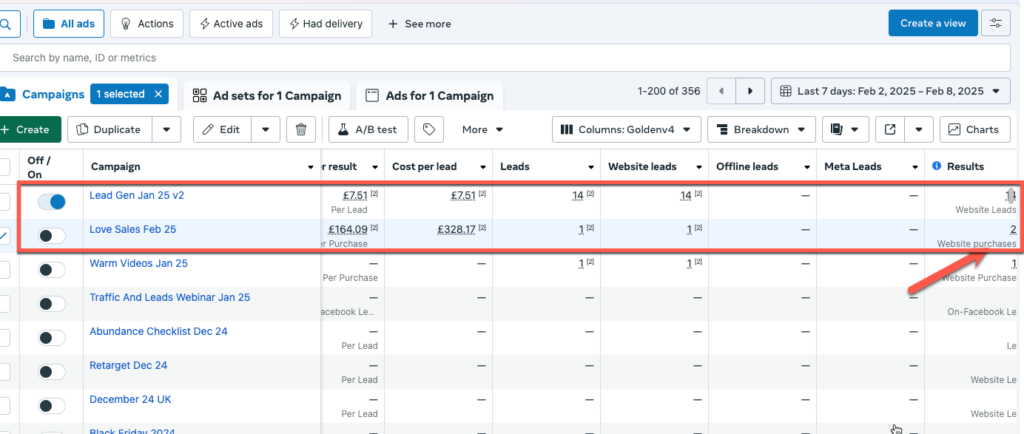
Now, let’s break it down…
Why I Focus on Lead Generation (Not Immediate Sales)
Most MSPs aren’t selling IT services instantly through ads. The sales cycle is longer because:
- IT contracts take time to switch.
- Buyers need multiple touchpoints before deciding.
- Cold traffic is unlikely to convert immediately.
That’s why I usually run lead gen ads instead of direct sales ads. When I get a lead, I can nurture them over time in my CRM, providing value before making the sale.
🚨 Key Takeaway: If you’re an MSP, your ad strategy should focus on capturing leads and building trust—not expecting an instant sale.
The #1 Place I Get My Ad Images
Now, let’s talk ad creatives—because great ads need great visuals.
You have a few options:
- Canva (easy but overused)
- Photoshop (requires design skills)
- MS Paint (please don’t 😂)
The problem with Canva? Everyone else is using the same templates. If you want scroll-stopping ads, you need something better.
Enter 99designs 🎨
99designs lets you launch a design contest where multiple designers submit ad creatives for your campaign.
Here’s how it works:
1️⃣ Start a contest (costs ~$39)
2️⃣ Designers submit 20-100+ custom ads
3️⃣ You pick a winner (or two!)
For my latest webinar campaign, I used 99designs to get multiple ad creatives. Instead of guessing what works, I ran two winning designs and tested which one performed better.
👇 Here’s a quick look at the process:
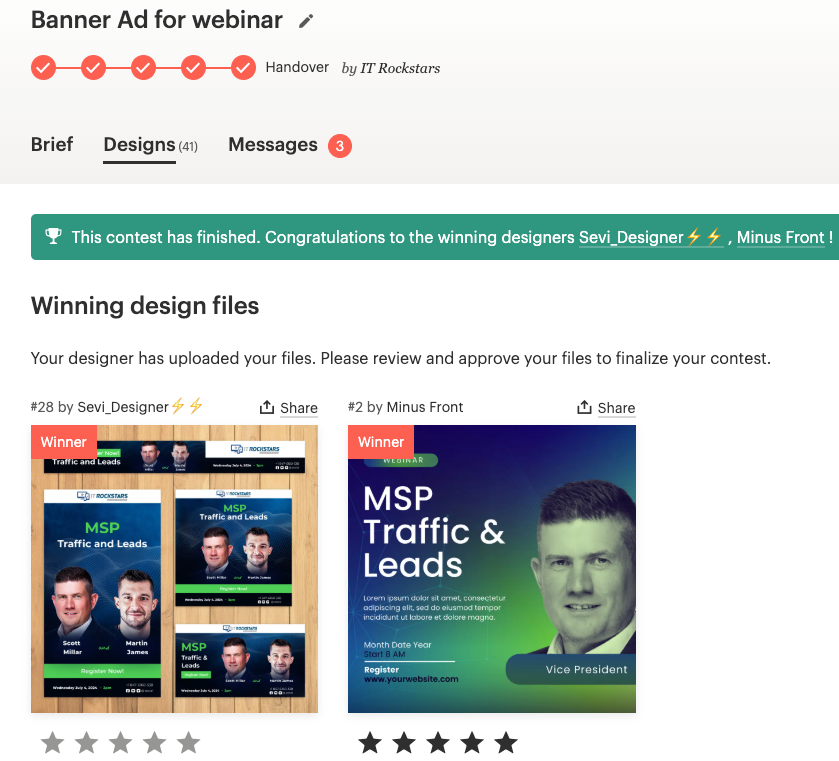
Why is this better than Canva?
✅ More variety (tons of unique designs)
✅ Higher quality (made by real designers)
✅ Better performance (optimized for ads)
If you’re serious about running high-converting ads, I highly recommend 99designs. I’ve used it for:
✔️ Facebook & LinkedIn ads
✔️ Webinar banners
✔️ Book covers
✔️ T-shirts & logos
Final Thoughts
If you’re running ads for your MSP, you need great creatives—and 99designs is the best way to get them.
Instead of struggling with Canva templates that blend in, let professional designers create ad images that grab attention and convert.
And remember: focus on lead generation first. The goal is to nurture leads and build trust—because that’s how MSPs win long-term clients.